Seven attendees. Two uncertain identities. Review the evidence, hold possible duplicates, and inspect native CRM writes, a duplicate-free repeat, and rollback.
People and contact details are fictional; company names and websites provide real context. Emails use .example.com to avoid real mailboxes. No company endorsement is implied.
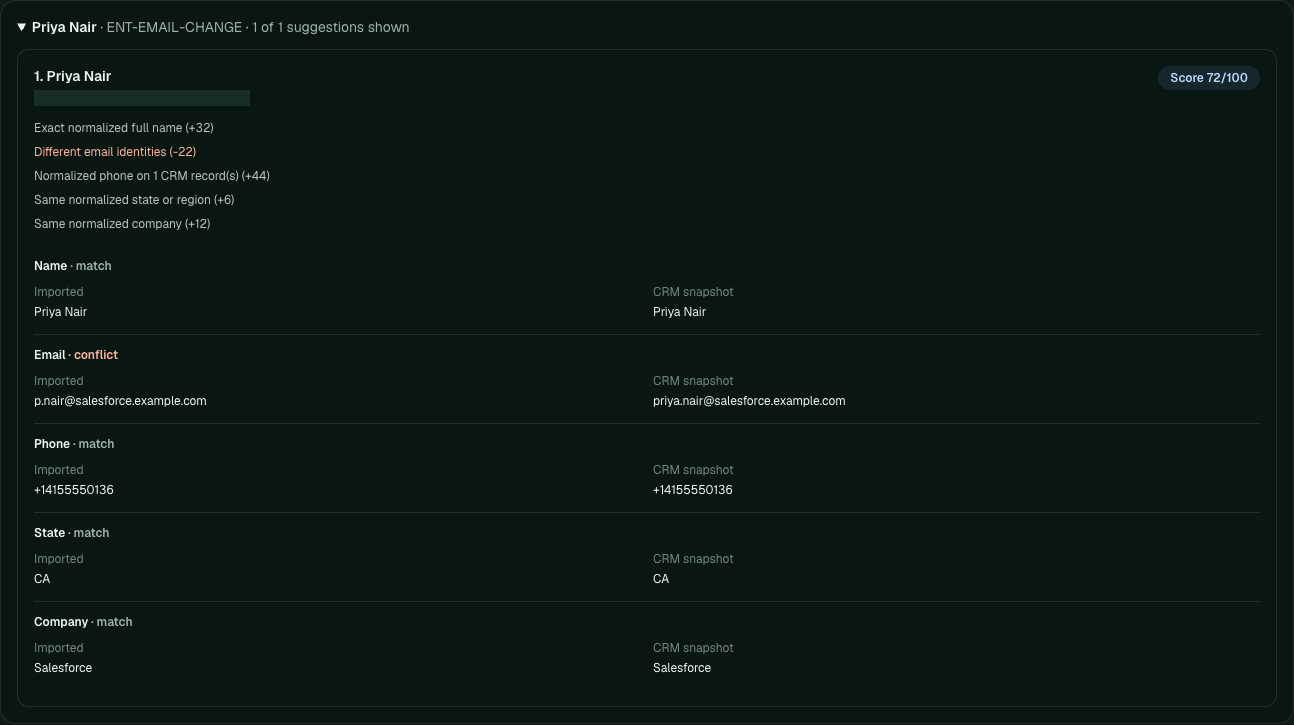
Name, phone, company, and state agree; email conflicts. Both CRMs produced a 72/100 suggestion, requiring review.
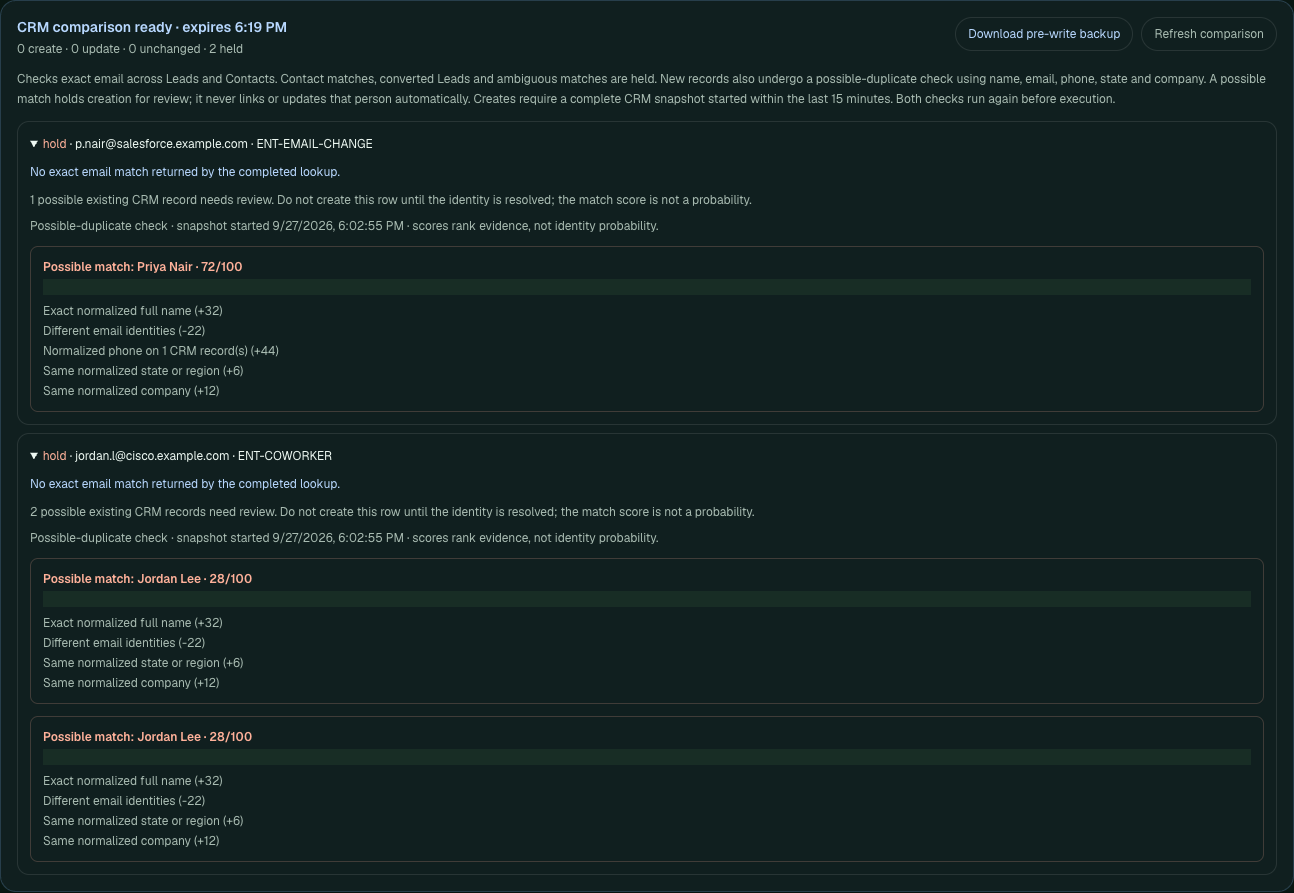
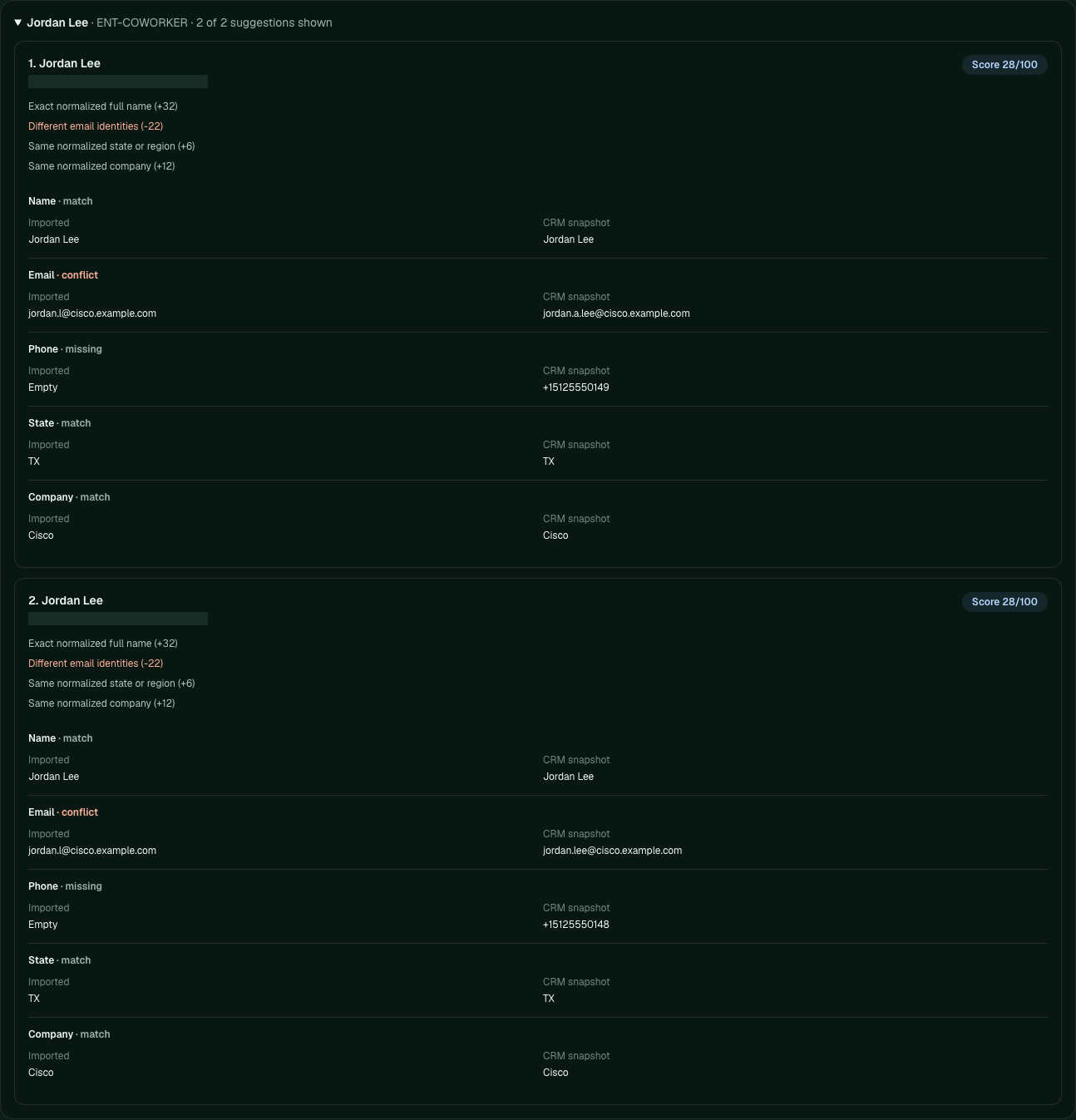
Two possible coworkers
Jordan Lee · Cisco
Director, Network Sales Senior Manager, Field Marketing
Two coworkers share the name, company, and state. Both score 28/100; the import has no phone or title to distinguish them.
Scores out of 100 rank evidence, not probability or certainty. The write preview now holds possible duplicates before creating records. It never merges or links people automatically.
Control Tower checks name, email, phone, state, and company before creating a record. It holds Priya and Jordan with their candidate evidence, independently of the CRM's rules. A complete snapshot started within 15 minutes is required; the server checks again at execution.
The gap this closes: Salesforce previously accepted the sparse Jordan row. Control Tower's follow-up check held both uncertain rows in both CRMs: zero creates, zero updates, two holds. Native read-back confirmed the records stayed unchanged.
New guard: even Jordan's weak 28/100 candidates hold creation for review. Scroll area expanded for readability; native IDs masked. These holds are enforced by Control Tower.
The original write, repeat, and rollback run below used a prepared five-row file that manually excluded these identities. The new hold check was verified separately against the retained development records.
The current guard also checks other active rows in the saved import, including later batches. Two new rows can be held as possible duplicates even when neither is in the CRM yet. This additional check is covered by automated local tests; it is separate from the dated native evidence shown here.
In the current self-hosted workspace, you can skip a row with a saved reason and restore it later. Skipping one duplicate in the file lets you review the retained row without editing the source file; a possible match already in the CRM still holds it.
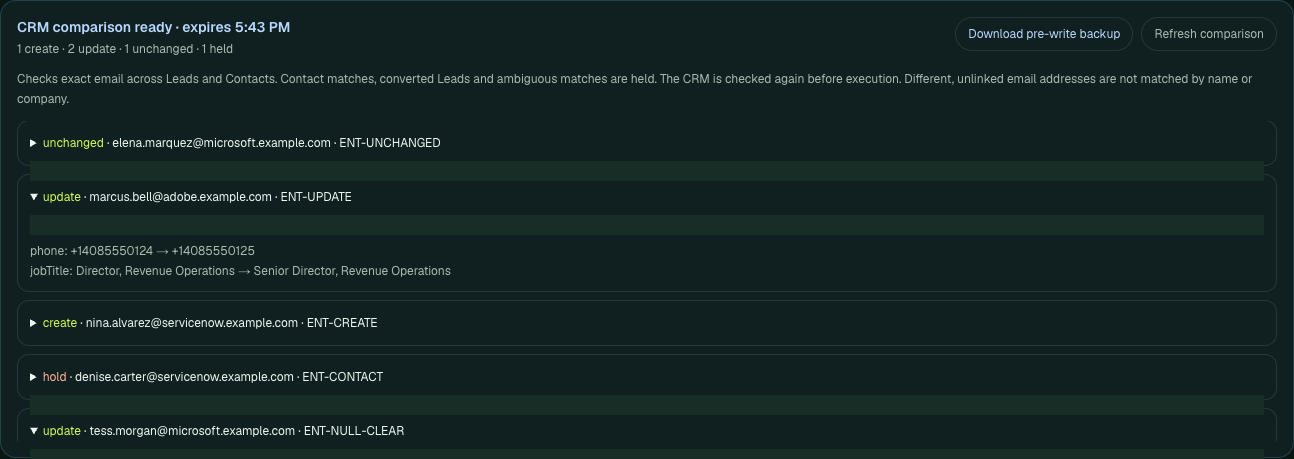
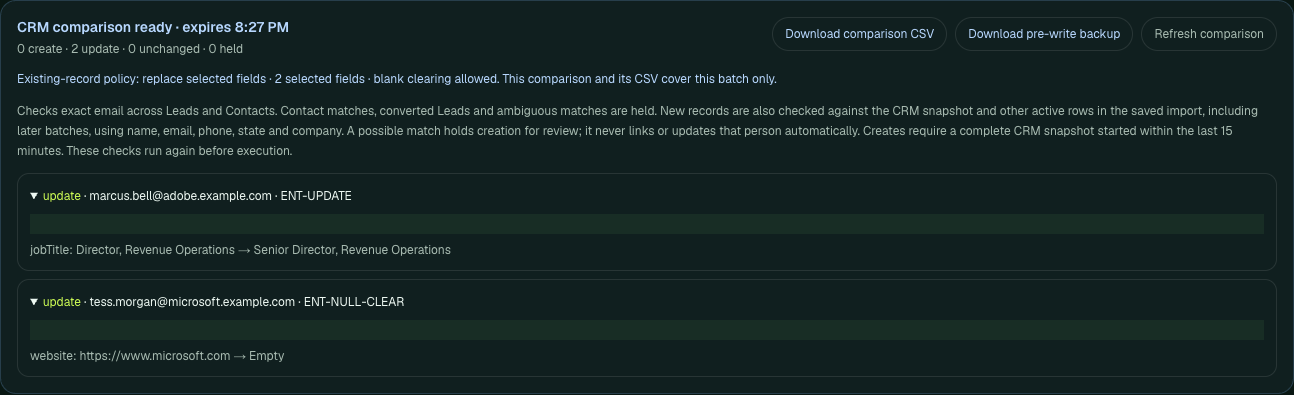
Create Nina. Update Marcus’s title and phone. Clear Tess’s website deliberately. Elena stays unchanged. Denise is unchanged in HubSpot; Salesforce holds her existing Contact, outside the Lead write path.
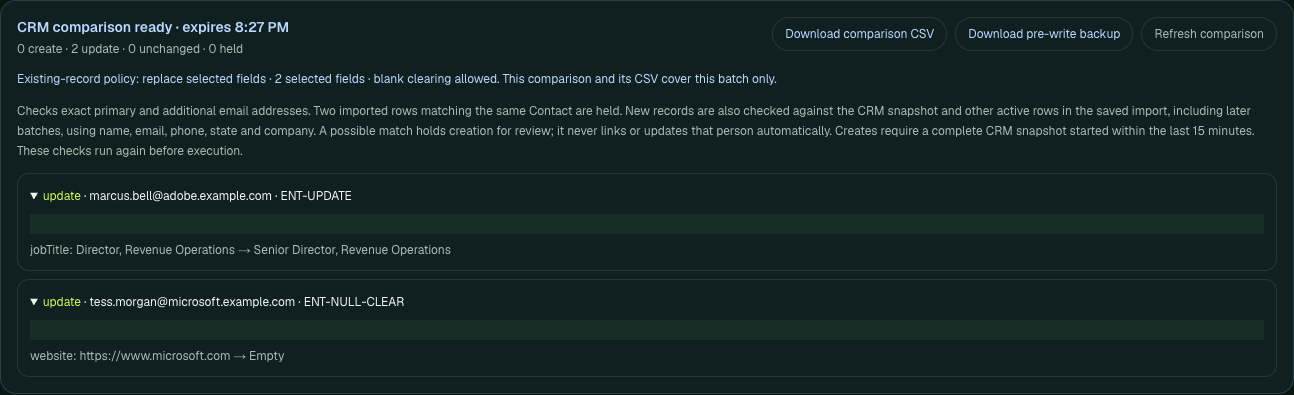
Current controls protect populated CRM values by default. Repeating these intentional changes requires selecting replacement fields and explicitly permitting blank clearing for Tess. Comparison and saved-results CSVs make each batch reviewable in a spreadsheet. A separate native check of these controls is shown below; this original import retains its date and scope.
Initial approved import · five rows per CRM
Outcome
HubSpot
Salesforce
Created
1
1
Updated
2
2
Unchanged
2
1
Held
0
1
Salesforce holds Denise’s existing Contact instead of creating a duplicate Lead.
04 · Submit the same approved file again
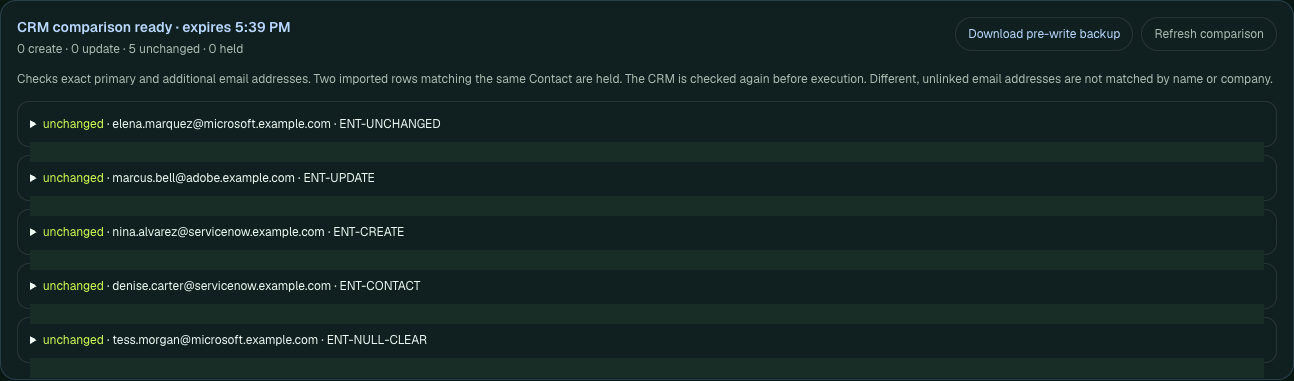
The second import has nothing new to write.
Read back the native records and repeat. Nina now exists; Marcus and Tess already have the requested values.
Repeat import · same approved file
Outcome
HubSpot
Salesforce
Created / updated
0 / 0
0 / 0
Unchanged / held
5 / 0
4 / 1
All five HubSpot contacts match the requested state. Nina is not created again.
05 · Restore the prior field values
Undo the two updates. Keep the new record.
The original receipt restores Marcus’s title and phone and Tess’s website in both CRMs. Native read-back checks the values. Nina remains: update rollback does not delete created records.
Salesforce restores two updates. The newly created Lead remains.
06 · Native follow-up · September 28, 2026 UTC
Keep good CRM data. Change only what you select.
A separate three-row check reused the retained development records. Default fill-empty settings proposed no changes. Elena was skipped with a saved reason; reloading, restoring and skipping her again kept the decision inspectable.
Selecting only job title and website changed Marcus’s title and cleared Tess’s website. Marcus’s imported phone change stayed out. A second fill-empty import restored Tess’s website while preserving her existing title, even though the file proposed a different one.
Observed in both development CRMs · no mocked responses
Check
HubSpot
Salesforce
Selected replacement / fill-empty
2 / 1 updated
2 / 1 updated
Original rollback
1 restored, 1 already restored
1 restored, 1 already restored
Final compared fields
All 9 records match starting values
All 9 records match starting values
Creates / deletes / failed rows
0 / 0 / 0
0 / 0 / 0
Only two selected fields may change. Native IDs masked; scroll area expanded for readability. See the HubSpot preview.
Results CSVs downloaded after reloading run history matched the saved receipts. The samples below retain observed outcomes and field changes; native, plan and run identifiers are redacted. Independent CRM reads checked portable fields, state, city, markers and owners. This is an existing-record workflow check, not a duplicate-detection benchmark.
Confirm the person. Keep their existing CRM email.
A possible match can now become an explicit operator decision. Review the candidate, save why it is the same person, then preview the permitted field changes. The choice identifies a HubSpot Contact or unconverted Salesforce Lead by its native record ID.
Confirmed by the operator
Priya’s email changed in the file.
The fictional name, direct phone, company and state supported the choice. The saved decision used the existing Priya record. Only her title changed; her CRM email stayed priya.nair@salesforce.example.com.
Still unresolved
Jordan remains held.
Two coworkers share the same name. No candidate was selected and no new record was created. A ranking score never chooses a person automatically.
Observed through the actual app APIs in both development CRMs
Check
HubSpot
Salesforce
Confirmed update / unresolved hold
1 / 1
1 / 1
Existing CRM email
Preserved
Preserved
Stale execution replay
Blocked · HTTP 409
Blocked · HTTP 409
Rollback / final compared fields
1 restored · all 9 unchanged
1 restored · all 9 unchanged
Creates / deletes
0 / 0
0 / 0
Saved choices survive workspace reloads. Changing a saved match returns that row to review; backups distinguish its imported and existing CRM emails. Changed source data, changed target values or competing import rows—including known HubSpot additional email addresses—require review again. The browser controls and additional-email collision cases were checked separately with simulated CRM responses; the native API checks above used no mocked responses. The public site presents evidence; connected actions run in a configured self-hosted workspace.
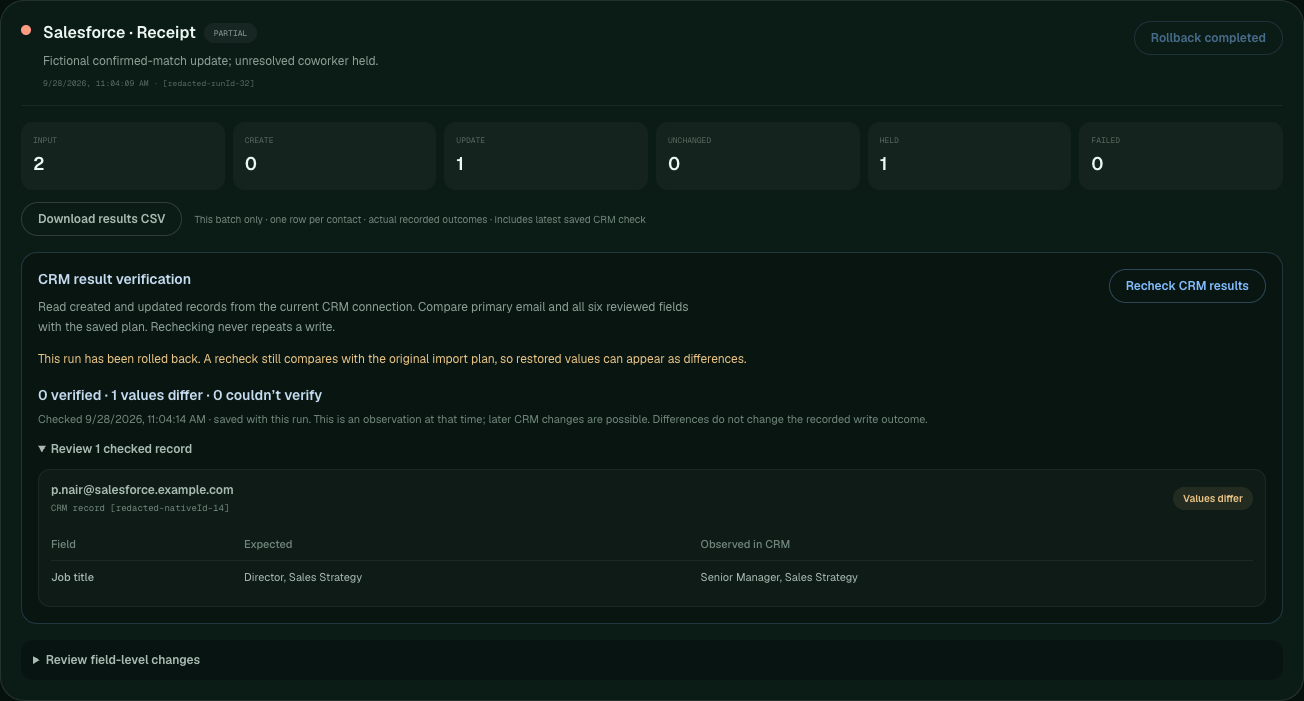
Saved runs now offer a read-only check of created and updated records. Control Tower compares primary email and six reviewed fields with the saved plan, then reports Verified, Values differ, or Couldn’t verify. The original write receipt stays intact.
In both development CRMs, Priya’s title update verified and her existing email was preserved. After deliberately rolling back her title, rechecking reported that difference without reapplying the update. Unresolved Jordan remained held and was never counted as verified.
Observed in HubSpot and Salesforce · real API reads
Check
HubSpot
Salesforce
Title update and read-only recheck
1 verified
1 verified
Recheck after deliberate rollback
1 value difference
1 value difference
Original write receipt
Preserved
Preserved
Final compared fixture fields
All 9 records restored
All 9 records restored
Actual saved run after rollback; record and run IDs masked. The difference is intentional: the check reports current values without repeating the import.
These CSVs contain the latest check, after rollback, alongside the original write outcome and expected versus observed values. This is a timestamped observation using the current CRM connection, not continuous monitoring or proof of what caused a difference. Older receipts without matching plan IDs cannot be checked. Missing-record, read-error and create-result cases were tested separately with simulated responses.
Pomade can prepare contact proposals and export a JSON handoff. Control Tower previews the whole file, shows missing information and source-review reasons, and loads it into a new saved workspace. Original values and source references stay visible beside the later CRM results.
Independent CSV workflow
Start with your own contact list.
Control Tower still works without Pomade. Ordinary CSV imports keep the existing create and update controls, field protection, and duplicate review.
Optional Pomade JSON
Review existing-record updates.
Handoff files permit updates only. An unmatched person is held. Pomade’s Ready status is source context, not proof of accuracy, a confirmed identity, or permission to write.
Select and map up to 100 Pomade rows, then download the preview plan. Larger selections stop; rows are never silently omitted.
In the self-hosted workspace, choose Import Pomade handoff, inspect every proposal, and choose Load in new saved workspace. Preview and loading make no CRM writes.
Use a direct CRM connector to compare existing people, resolve review holds, select protected field changes, and explicitly execute the reviewed plan.
Inspect the receipt, source context, read-only verification, and eligible rollback in saved runs.
Local and private hosted Pomade can each export a file; neither installation has to share an account or database with Control Tower. Pomade’s separate direct CRM workflow remains independent. Legacy handoffs label missing dates, installation details, status, and evidence as unknown. Evidence for a value that changes remains historical source context.
Try the shape of the handoff: the four-row sample below is manually prepared, with fictional people and companies, reserved example.com emails, and no research citations. It does not seed a CRM, assert an existing match, or represent native execution evidence. This static page documents the workflow; actual loading requires a persistent self-hosted workspace.
Separate native qualification · September 28, 2026: the actual Pomade exporter helper and Control Tower APIs updated and verified one fictional title in each development CRM. Both held an unmatched proposal and an upstream Review row, preserved email and unselected fields, and reloaded the saved source context. A stale replay was rejected; rollback restored all nine retained records’ compared fields. A subsequent read-only check reported the deliberate title difference. Zero creates or deletes.
That check used HubSpot STANDARD as a designated development portal and Salesforce Developer Edition (IsSandbox=false), with real CRM responses. It used manually supplied proposals, not live enrichment, and is separate from browser tests with simulated CRM responses. Inspect the dated result summary ↗